EasyExcel-Annotation-Description-And-Usage-Guide
- Easyexcel(1-注解介绍与使用)
- Easyexcel(2-文件多Sheet、不同对象、多数据读取)
- Easyexcel(3-文件导出)
- Easyexcel(4-模板文件定义与导出)
- Easyexcel(5-自定义列宽)
- Easyexcel(6-单元格合并)
- Easyexcel(7-自定义样式)
- Easyexcel(8-通用工具类)
版本依赖
<dependency>
    <groupId>com.alibaba</groupId>
    <artifactId>easyexcel</artifactId>
    <version>3.3.3</version>
</dependency>
@ExcelProperty
指定当前字段对应 excel 中的那一列,可以根据名字或者 Index 去匹配,当然也可以不写。
value:指定写入的列头,如果不指定则使用成员变量的名字作为列头;如果要设置复杂的头,可以为value指定多个值order:优先级高于value,会根据order的顺序来匹配实体和excel中数据的顺序index:优先级高于value和order,指定写到第几列,如果不指定则根据成员变量位置排序;默认第一个字段就是index=0converter:指定当前字段用什么转换器,默认会自动选择。可以用来设置类型转换器,需要实现Converter接口
value
指定属性名
@Data
public class User {

    private Integer userId;

    private String name;

    private String phone;

    private String email;

    private Date createTime;
}
@RestController
public class TestController {

    @GetMapping("/test1")
    public void test1(HttpServletResponse response) {
        try {
            response.setContentType("application/vnd.ms-excel");
            response.setCharacterEncoding("utf-8");
            String fileName = URLEncoder.encode("test1", "UTF-8").replaceAll("\\+", "%20");
            response.setHeader("Content-disposition", "attachment;filename" + fileName + ".xls");

            User user = new User();
            user.setUserId(123);
            user.setName("as");
            user.setPhone("15213");
            user.setEmail("5456");
            user.setCreateTime(13213L);
            EasyExcel.write(response.getOutputStream(), User.class)
                    .sheet("test")
                    .doWrite(Arrays.asList(user));
        } catch (Exception e) {
            e.printStackTrace();
        }
    }
}
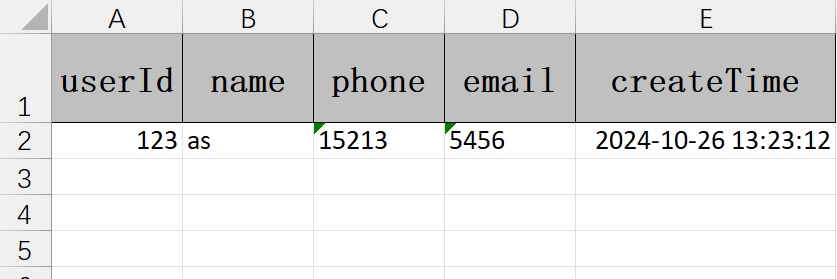
默认情况下,使用类的属性名作为 Excel 的列表,当然也可以使用 @ExcelProperty 注解来重新指定属性名称。
@Data
public class User {
    @ExcelProperty(value = "用户Id")
    private Integer userId;

    @ExcelProperty(value = "姓名")
    private String name;

    @ExcelProperty(value = "手机")
    private String phone;

    @ExcelProperty(value = "邮箱")
    private String email;

    @ExcelProperty(value = "创建时间")
    private Date createTime;
}
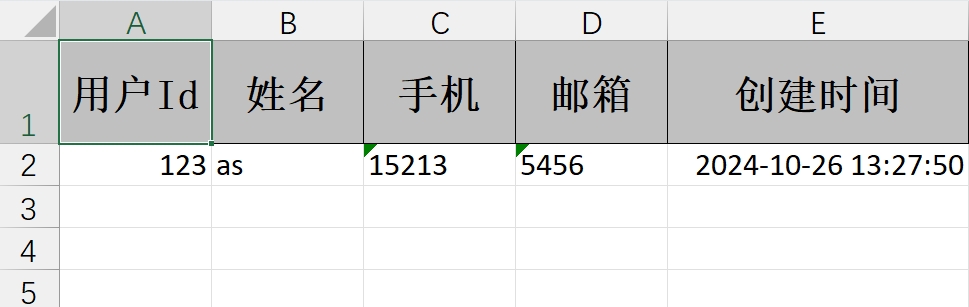
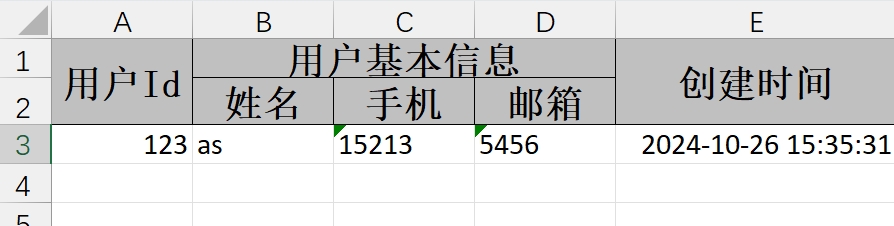
表头合并
value 在写的时候,如果指定了多个值,会自动进行合并
@Data
public class User {
    @ExcelProperty(value = "用户Id")
    private Integer userId;

    @ExcelProperty(value = {"用户基本信息", "姓名"})
    private String name;

    @ExcelProperty(value = {"用户基本信息", "手机"})
    private String phone;

    @ExcelProperty(value = {"用户基本信息", "邮箱"})
    private String email;

    @ExcelProperty(value = "创建时间")
    private Date createTime;
}
index
指定位置
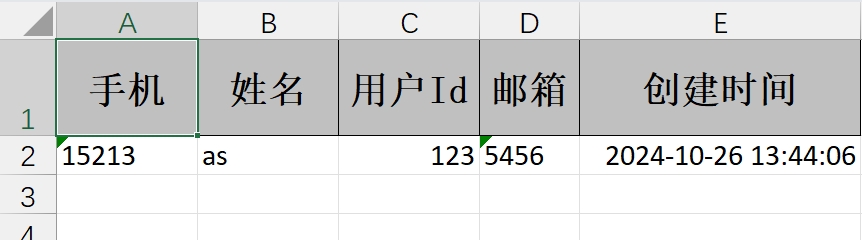
@ExcelProperty 注解有两个属性 index 和 order,如果不指定则按照属性在类中的排列顺序来。index 是指定该属性在 Excel 中列的下标,下标从 0 开始
@Data
public class User {
    @ExcelProperty(value = "用户Id", index = 2)
    private Integer userId;

    @ExcelProperty(value = "姓名", index = 1)
    private String name;

    @ExcelProperty(value = "手机")
    private String phone;

    @ExcelProperty(value = "邮箱")
    private String email;

    @ExcelProperty(value = "创建时间")
    private Date createTime;
}
@Data
public class User {
    @ExcelProperty(value = "用户Id", index = 2)
    private Integer userId;

    @ExcelProperty(value = "姓名", index = 1)
    private String name;

    @ExcelProperty(value = "手机", index = 10)
    private String phone;

    @ExcelProperty(value = "邮箱", index = 12)
    private String email;

    @ExcelProperty(value = "创建时间")
    private Date createTime;
}

order
指定顺序
@Data
public class User {
    @ExcelProperty(value = "用户Id")
    private Integer userId;

    @ExcelProperty(value = "姓名")
    private String name;

    @ExcelProperty(value = "手机", order = 11)
    private String phone;

    @ExcelProperty(value = "邮箱", order = 10)
    private String email;

    @ExcelProperty(value = "创建时间")
    private Long createTime;
}
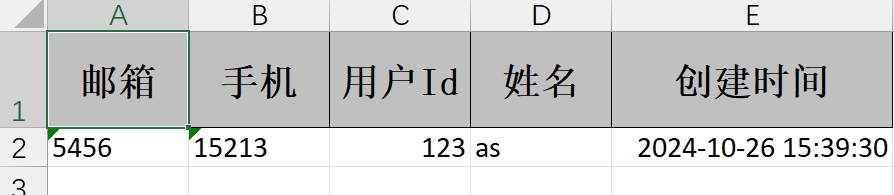
order 的默认值为 Integer.MAX_VALUE,通过效果我们可以得出结论:order 值越小,越排在前面
注意:
- 优先级:
index > order > 默认配置 index相当于绝对位置,下标从 0 开始order相当于相对位置,值越小的排在越前面
convert
自定义转换器
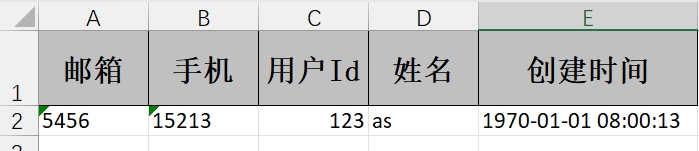
在读写 EXCEL 时,有时候需要我们进行数据类型转换,例如我们这里的创建时间,在实体对象中是 Long 类型,但是这样直接导出到 Excel 中不太直观。我们需要转换成 yyyy-MM-dd HH:mm:ss 格式,此时我们就可以用到转换器。
public class DateTimeConverter implements Converter<Long> {

    private final DateTimeFormatter dateTimeFormatter = DateTimeFormatter.ofPattern("yyyy-MM-dd HH:mm:ss");

    // 支持导入的Java类型
    @Override
    public Class<?> supportJavaTypeKey() {
        return Long.class;
    }

    // 支持导出的Excel类型
    @Override
    public CellDataTypeEnum supportExcelTypeKey() {
        return CellDataTypeEnum.STRING;
    }

    // 转换为Java
    @Override
    public Long convertToJavaData(ReadCellData<?> cellData, ExcelContentProperty contentProperty, GlobalConfiguration globalConfiguration) throws Exception {
        return null;
    }

    // 转换为Excel
    @Override
    public WriteCellData<?> convertToExcelData(Long value, ExcelContentProperty contentProperty, GlobalConfiguration globalConfiguration) throws Exception {
        if (value == null) {
            return new WriteCellData(CellDataTypeEnum.STRING, null);
        }
        LocalDateTime localDateTime = LocalDateTime.ofInstant(Instant.ofEpochMilli(value), ZoneId.systemDefault());
        String dateStr = localDateTime.format(dateTimeFormatter);
        return new WriteCellData(dateStr);
    }
}
@Data
public class User {
    @ExcelProperty(value = "用户Id")
    private Integer userId;

    @ExcelProperty(value = "姓名")
    private String name;

    @ExcelProperty(value = "手机", order = 11)
    private String phone;

    @ExcelProperty(value = "邮箱", order = 10)
    private String email;

    @ExcelProperty(value = "创建时间", converter = DateTimeConverter.class)
    private Long createTime;
}
枚举转换
/**
 * Excel 性别转换器
 */
public class GenderConverter implements Converter<Integer> {
    @Override
    public Class<?> supportJavaTypeKey() {
        return Integer.class;
    }

    @Override
    public CellDataTypeEnum supportExcelTypeKey() {
        return CellDataTypeEnum.STRING;
    }

    @Override
    public Integer convertToJavaData(ReadConverterContext<?> context) {
        return GenderEnum.convert(context.getReadCellData().getStringValue()).getValue();
    }

    @Override
    public WriteCellData<?> convertToExcelData(WriteConverterContext<Integer> context) {
        return new WriteCellData<>(GenderEnum.convert(context.getValue()).getDescription());
    }
}
/**
 * 性别枚举
 */
@Getter
@AllArgsConstructor
public enum GenderEnum {

    UNKNOWN(0, "未知"),

    MALE(1, "男性"),

    FEMALE(2, "女性");

    private final Integer value;

    private final String description;

    public static GenderEnum convert(Integer value) {
        return Stream.of(values())
                .filter(bean -> bean.value.equals(value))
                .findAny()
                .orElse(UNKNOWN);
    }

    public static GenderEnum convert(String description) {
        return Stream.of(values())
                .filter(bean -> bean.description.equals(description))
                .findAny()
                .orElse(UNKNOWN);
    }
}
@ExcelIgnore
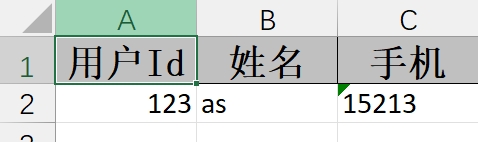
默认所有字段都会和 excel 去匹配,加了这个注解会忽略该字段
@Data
public class User {
    @ExcelProperty(value = "用户Id")
    private Integer userId;

    @ExcelProperty(value = "姓名")
    private String name;

    @ExcelProperty(value = "手机")
    private String phone;

    @ExcelProperty(value = "邮箱")
    @ExcelIgnore
    private String email;

    @ExcelProperty(value = "创建时间", converter = DateTimeConverter.class)
    @ExcelIgnore
    private Long createTime;
}
@ExcelIgnoreUnannotated
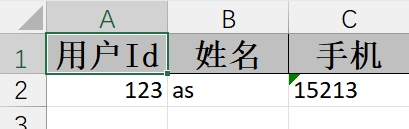
不标注该注解时,默认类中所有成员变量都会参与读写,无论是否在成员变量上加了 @ExcelProperty 的注解。标注该注解后,类中的成员变量如果没有标注 @ExcelProperty 注解将不会参与读写。
@ExcelIgnoreUnannotated
@Data
public class User {

    @ExcelProperty(value = "用户Id")
    private Integer userId;

    @ExcelProperty(value = "姓名")
    private String name;

    @ExcelProperty(value = "手机")
    private String phone;

    private String email;

    private Long createTime;
}
@ColumnWidth
用于设置表格列的宽度
@Data
public class User {

    @ColumnWidth(200)
    @ExcelProperty(value = "用户Id")
    private Integer userId;

    @ExcelProperty(value = "姓名")
    private String name;

    @ExcelProperty(value = "手机")
    private String phone;

    @ExcelProperty(value = "邮箱")
    private String email;

    @ExcelProperty(value = "创建时间", converter = DateTimeConverter.class)
    private Long createTime;
}

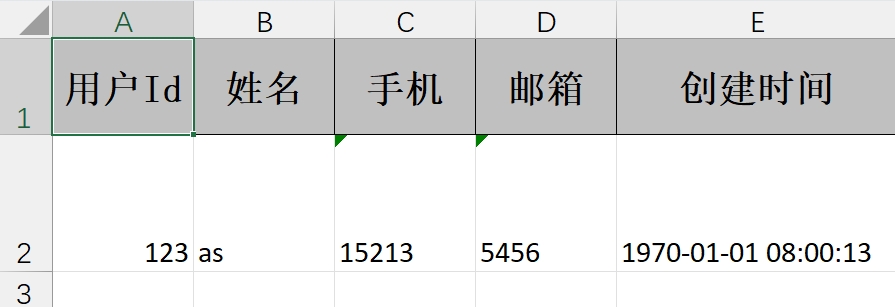
@ContentRowHeight
标注在类上,指定内容行高
@Data
@ContentRowHeight(value = 50)
public class User {

    @ExcelProperty(value = "用户Id")
    private Integer userId;

    @ExcelProperty(value = "姓名")
    private String name;

    @ExcelProperty(value = "手机")
    private String phone;

    @ExcelProperty(value = "邮箱")
    private String email;

    @ExcelProperty(value = "创建时间", converter = DateTimeConverter.class)
    private Long createTime;
}
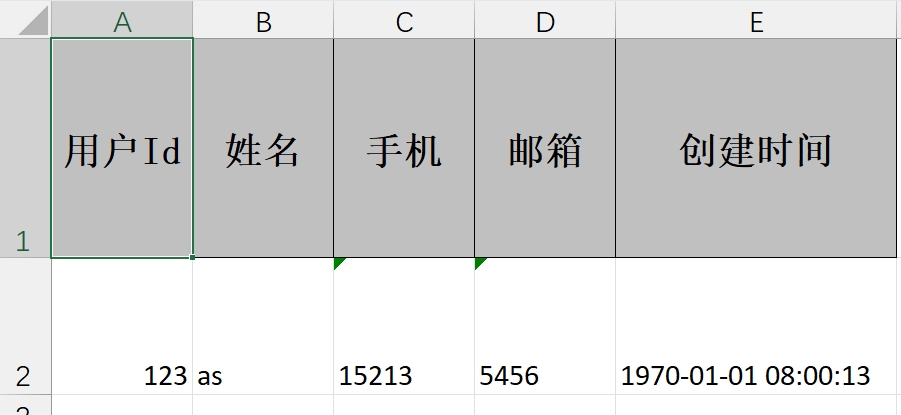
@HeadRowHeight
标注在类上,指定列头行高
@Data
@HeadRowHeight(80)
@ContentRowHeight(value = 50)
public class User {

    @ExcelProperty(value = "用户Id")
    private Integer userId;

    @ExcelProperty(value = "姓名")
    private String name;

    @ExcelProperty(value = "手机")
    private String phone;

    @ExcelProperty(value = "邮箱")
    private String email;

    @ExcelProperty(value = "创建时间", converter = DateTimeConverter.class)
    private Long createTime;
}
@ContentStyle
用于设置内容格式注解
dataFormat:日期格式hidden:设置单元格使用此样式隐藏locked:设置单元格使用此样式锁定quotePrefix:在单元格前面增加`符号,数字或公式将以字符串形式展示horizontalAlignment:设置是否水平居中wrapped:设置文本是否应换行。将此标志设置为true通过在多行上显示使单元格中的所有内容可见verticalAlignment:设置是否垂直居中rotation:设置单元格中文本旋转角度。03 版本的Excel旋转角度区间为-90° ~ 90°,07 版本的Excel旋转角度区间为0° ~ 180°indent:设置单元格中缩进文本的空格数borderLeft:设置左边框的样式borderRight:设置右边框样式borderTop:设置上边框样式borderBottom:设置下边框样式leftBorderColor:设置左边框颜色rightBorderColor:设置右边框颜色topBorderColor:设置上边框颜色bottomBorderColor:设置下边框颜色fillPatternType:设置填充类型fillBackgroundColor:设置背景色fillForegroundColor:设置前景色shrinkToFit:设置自动单元格自动大小
@ContentFontStyle
用于设置单元格内容字体格式的注解
fontName:字体名称fontHeightInPoints:字体高度italic:是否斜体strikeout:是否设置删除水平线color:字体颜色typeOffset:偏移量underline:下划线bold:是否加粗charset:编码格式
@HeadStyle
用于设置标题样式
dataFormat:日期格式hidden:设置单元格使用此样式隐藏locked:设置单元格使用此样式锁定quotePrefix:在单元格前面增加`符号,数字或公式将以字符串形式展示horizontalAlignment:设置是否水平居中wrapped:设置文本是否应换行。将此标志设置为true通过在多行上显示使单元格中的所有内容可见verticalAlignment:设置是否垂直居中rotation:设置单元格中文本旋转角度。03 版本的Excel旋转角度区间为-90° ~ 90°,07 版本的Excel旋转角度区间为0° ~ 180°indent:设置单元格中缩进文本的空格数borderLeft:设置左边框的样式borderRight:设置右边框样式borderTop:设置上边框样式borderBottom:设置下边框样式leftBorderColor:设置左边框颜色rightBorderColor:设置右边框颜色topBorderColor:设置上边框颜色bottomBorderColor:设置下边框颜色fillPatternType:设置填充类型fillBackgroundColor:设置背景色fillForegroundColor:设置前景色shrinkToFit:设置自动单元格自动大小
@HeadFontStyle
用于定制标题字体格式
fontName:设置字体名称fontHeightInPoints:设置字体高度italic:设置字体是否斜体strikeout:是否设置删除线color:设置字体颜色typeOffset:设置偏移量underline:设置下划线charset:设置字体编码bold:设置字体是否加粗
@ContentLoopMerge
用于设置合并单元格的注解,作用于字段上
eachRow:合并列columnExtend:合并行
@OnceAbsoluteMerge
用于指定位置的单元格合并,作用于类上
firstRowIndex:第一行下标lastRowIndex:最后一行下标firstColumnIndex:第一列下标lastColumnIndex:最后一列下标
@DateTimeFormat
日期转换,读取 Excel 文件时用 String 去接收 excel 日期格式的数据会调用这个注解。里面的 value 参照 java.text.SimpleDateFormat
@Data
public class User {

    @ExcelProperty(value = "用户Id")
    private Integer userId;

    @ExcelProperty(value = "姓名")
    private String name;

    @ExcelProperty(value = "手机")
    private String phone;

    @ExcelProperty(value = "邮箱")
    private String email;

    @DateTimeFormat("yyyy-MM-dd")
    @ExcelProperty(value = "创建时间")
    private Date createTime;
}
@NumberFormat
数字转换,用 String 去接收 excel 数字格式的数据会调用这个注解。里面的 value 参照 java.text.DecimalFormat