EasyExcel-Customlize-Column-Width
- Easyexcel(1-注解介绍与使用)
- Easyexcel(2-文件多Sheet、不同对象、多数据读取)
- Easyexcel(3-文件导出)
- Easyexcel(4-模板文件定义与导出)
- Easyexcel(5-自定义列宽)
- Easyexcel(6-单元格合并)
- Easyexcel(7-自定义样式)
- Easyexcel(8-通用工具类)
- Easyexcel(5-自定义列宽)
注解
@ColumnWidth
@Data
public class WidthAndHeightData {

    @ExcelProperty("字符串标题")
    private String string;

    @ExcelProperty("日期标题")
    private Date date;

    @ColumnWidth(50)
    @ExcelProperty("数字标题")
    private Double doubleData;
}
注解使用时表头长度无法做到动态调整,只能固定设置,每次调整表头长度时只能重新修改代码
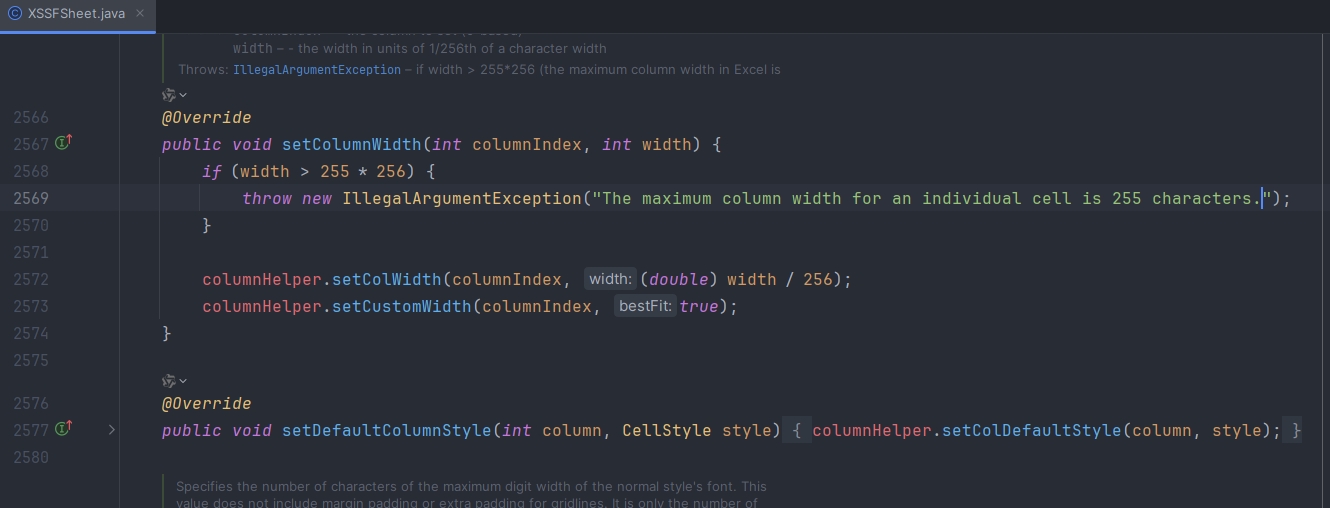
注意:@ColumnWidth 最大值只能为255,超过255 * 256长度时会报错
查看XSSFSheet源码
类方法
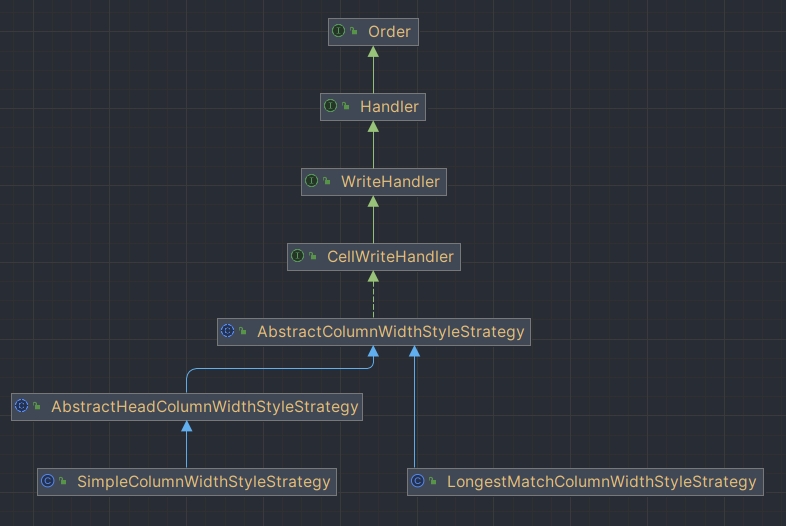
AbstractHeadColumnWidthStyleStrategy
public abstract class AbstractHeadColumnWidthStyleStrategy extends AbstractColumnWidthStyleStrategy {

    @Override
    protected void setColumnWidth(WriteSheetHolder writeSheetHolder, List<WriteCellData<?>> cellDataList, Cell cell, Head head,
        Integer relativeRowIndex, Boolean isHead) {
        // 判断是否满足 当前行索引不为空 && (当前是表头 || 当前行索引是首行)
        // 如果不满足,则说明不是表头,不需要设置
        boolean needSetWidth = relativeRowIndex != null && (isHead || relativeRowIndex == 0);
        if (!needSetWidth) {
            return;
        }
        Integer width = columnWidth(head, cell.getColumnIndex());
        if (width != null) {
            width = width * 256;
            writeSheetHolder.getSheet().setColumnWidth(cell.getColumnIndex(), width);
        }
    }

    protected abstract Integer columnWidth(Head head, Integer columnIndex);
}
通过继承 AbstractHeadColumnWidthStyleStrategy 类,实现 columnWidth 方法获取其对应列的宽度
SimpleColumnWidthStyleStrategy
源码查看
public class SimpleColumnWidthStyleStrategy extends AbstractHeadColumnWidthStyleStrategy {
    private final Integer columnWidth;

    public SimpleColumnWidthStyleStrategy(Integer columnWidth) {
        this.columnWidth = columnWidth;
    }

    @Override
    protected Integer columnWidth(Head head, Integer columnIndex) {
        return columnWidth;
    }
}
基本使用
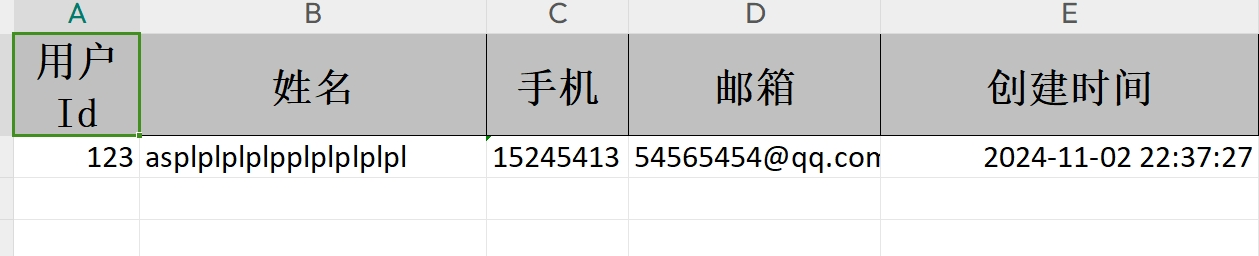
通过 registerWriteHandler 设置策略方法调整每列的固定宽度
@Data
public class User {

    @ExcelProperty(value = "用户Id")
    private Integer userId;

    @ExcelProperty(value = "姓名")
    private String name;

    @ExcelProperty(value = "手机")
    private String phone;

    @ExcelProperty(value = "邮箱")
    private String email;

    @ExcelProperty(value = "创建时间")
    private Date createTime;
}
@GetMapping("/download2")
public void download2(HttpServletResponse response) {
    try {
        response.setContentType("application/vnd.ms-excel");
        response.setCharacterEncoding("utf-8");
        // 这里URLEncoder.encode可以防止中文乱码 当然和easyexcel没有关系
        String fileName = URLEncoder.encode("测试", "UTF-8").replaceAll("\\+", "%20");
        response.setHeader("Content-disposition", "attachment;filename=" + fileName + ".xls");

        User user = new User();
        user.setUserId(123);
        user.setName("asplplplplpplplplplpl");
        user.setPhone("15245413");
        user.setEmail("54565454@qq.com");
        user.setCreateTime(new Date());
        EasyExcel.write(response.getOutputStream(), User.class)
                .sheet("模板")
                .registerWriteHandler(new SimpleColumnWidthStyleStrategy(20))
                .doWrite(Arrays.asList(user));
    } catch (Exception e) {
        e.printStackTrace();
    }
}

LongestMatchColumnWidthStyleStrategy
源码查看
public class LongestMatchColumnWidthStyleStrategy extends AbstractColumnWidthStyleStrategy {

    private static final int MAX_COLUMN_WIDTH = 255;

    private final Map<Integer, Map<Integer, Integer>> cache = MapUtils.newHashMapWithExpectedSize(8);

    @Override
    protected void setColumnWidth(WriteSheetHolder writeSheetHolder, List<WriteCellData<?>> cellDataList, Cell cell,
        Head head,
        Integer relativeRowIndex, Boolean isHead) {
        // 判断 是否为表头 || 导出内容是否为空
        boolean needSetWidth = isHead || !CollectionUtils.isEmpty(cellDataList);
        if (!needSetWidth) {
            return;
        }
        Map<Integer, Integer> maxColumnWidthMap = cache.computeIfAbsent(writeSheetHolder.getSheetNo(), key -> new HashMap<>(16));
        Integer columnWidth = dataLength(cellDataList, cell, isHead);
        if (columnWidth < 0) {
            return;
        }
        // 超过最大值255时则设置为255
        if (columnWidth > MAX_COLUMN_WIDTH) {
            columnWidth = MAX_COLUMN_WIDTH;
        }
        // 比较该列的宽度,如果比原来的宽度大,则重新设置
        Integer maxColumnWidth = maxColumnWidthMap.get(cell.getColumnIndex());
        if (maxColumnWidth == null || columnWidth > maxColumnWidth) {
            maxColumnWidthMap.put(cell.getColumnIndex(), columnWidth);
            writeSheetHolder.getSheet().setColumnWidth(cell.getColumnIndex(), columnWidth * 256);
        }
    }

    private Integer dataLength(List<WriteCellData<?>> cellDataList, Cell cell, Boolean isHead) {
        // 如果是表头,则返回表头的宽度
        if (isHead) {
            return cell.getStringCellValue().getBytes().length;
        }
        // 如果是单元格内容,则根据类型返回其内容的宽度
        WriteCellData<?> cellData = cellDataList.get(0);
        CellDataTypeEnum type = cellData.getType();
        if (type == null) {
            return -1;
        }
        switch (type) {
            case STRING:
                return cellData.getStringValue().getBytes().length;
            case BOOLEAN:
                return cellData.getBooleanValue().toString().getBytes().length;
            case NUMBER:
                return cellData.getNumberValue().toString().getBytes().length;
            default:
                return -1;
        }
    }
}
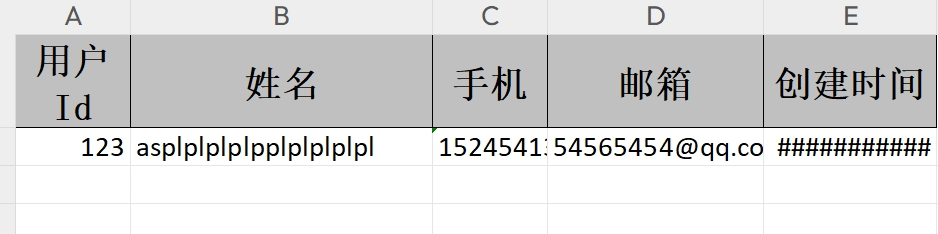
LongestMatchColumnWidthStyleStrategy 是一个列宽自适应策略。当我们在写入Excel数据时,如果希望根据数据的实际长度来自适应调整列宽,就可以使用这个策略。它会遍历指定列的所有数据(包括表头),找出最长的数据,然后根据这个最长数据的长度来设定该列的宽度,确保数据在单元格内不会被截断。
根据官网介绍:这个目前不是很好用,比如有数字就会导致换行。而且长度也不是刚好和实际长度一致。 所以需要精确到刚好列宽的慎用。
基本使用
@GetMapping("/download1")
public void download1(HttpServletResponse response) {
    try {
        response.setContentType("application/vnd.ms-excel");
        response.setCharacterEncoding("utf-8");
        // 这里URLEncoder.encode可以防止中文乱码 当然和easyexcel没有关系
        String fileName = URLEncoder.encode("测试", "UTF-8").replaceAll("\\+", "%20");
        response.setHeader("Content-disposition", "attachment;filename=" + fileName + ".xls");

        User user = new User();
        user.setUserId(123);
        user.setName("asplplplplpplplplplpl");
        user.setPhone("15245413");
        user.setEmail("54565454@qq.com");
        user.setCreateTime(new Date());
        EasyExcel.write(response.getOutputStream(), User.class)
                .sheet("模板")
                .registerWriteHandler(new LongestMatchColumnWidthStyleStrategy())
                .doWrite(Arrays.asList(user));
    } catch (Exception e) {
        e.printStackTrace();
    }
}
表头宽度工具类
仿照 LongestMatchColumnWidthStyleStrategy 源码自定义工具类
使用构造器传参的方式,用户可以自定义通过表头或者单元格内容长度来设置列宽,通过修改常数值和比例可以自己设置想调整的列宽
/**
 * 表头宽度根据表头或数据内容自适应
 */
public class CustomWidthStyleStrategy extends AbstractColumnWidthStyleStrategy {

    /**
     * 1-根据表头宽度,2-根据单元格内容
     */
    private Integer type;

    private Map<Integer, Map<Integer, Integer>> cache = new HashMap<>();

    public CustomWidthStyleStrategy(Integer type) {
        this.type = type;
    }

    /**
     * 设置列宽
     *
     * @param writeSheetHolder 写入Sheet的持有者
     * @param cellDataList 当前列的单元格数据列表
     * @param cell 当前单元格
     * @param head 表头
     * @param relativeRowIndex 当前行的相对索引
     * @param isHead 是否为表头
     */
    @Override
    protected void setColumnWidth(WriteSheetHolder writeSheetHolder, List<WriteCellData<?>> cellDataList, Cell cell, Head head, Integer relativeRowIndex, Boolean isHead) {
        if (type == 1) {
            if (isHead) {
                int columnWidth = cell.getStringCellValue().length();
                columnWidth = Math.max(columnWidth * 2, 20);
                if (columnWidth > 255) {
                    columnWidth = 255;
                }
                writeSheetHolder.getSheet().setColumnWidth(cell.getColumnIndex(), columnWidth * 256);
            }
            return;
        }
        //不把标头计算在内
        boolean needSetWidth = isHead || !CollectionUtils.isEmpty(cellDataList);
        if (needSetWidth) {
            Map<Integer, Integer> maxColumnWidthMap = cache.get(writeSheetHolder.getSheetNo());
            if (maxColumnWidthMap == null) {
                maxColumnWidthMap = new HashMap<>();
                cache.put(writeSheetHolder.getSheetNo(), maxColumnWidthMap);
            }

            Integer columnWidth = this.dataLength(cellDataList, cell, isHead);
            if (columnWidth >= 0) {
                if (columnWidth > 255) {
                    columnWidth = 255;
                }
                Integer maxColumnWidth = maxColumnWidthMap.get(cell.getColumnIndex());
                if (maxColumnWidth == null || columnWidth > maxColumnWidth) {
                    maxColumnWidthMap.put(cell.getColumnIndex(), columnWidth);
                    writeSheetHolder.getSheet().setColumnWidth(cell.getColumnIndex(), columnWidth * 256);
                }
            }
        }
    }

    /**
     * 数据长度
     *
     * @param cellDataList
     * @param cell
     * @param isHead
     * @return
     */
    private Integer dataLength(List<WriteCellData<?>> cellDataList, Cell cell, Boolean isHead) {
        //头直接返回原始长度
        if (isHead) {
            return cell.getStringCellValue().getBytes().length;
        } else {
            //不是头的话  看是什么类型  用数字加就可以了
            WriteCellData cellData = cellDataList.get(0);
            CellDataTypeEnum type = cellData.getType();
            if (type == null) {
                return -1;
            } else {
                switch (type) {
                    case STRING:
                        return cellData.getStringValue().getBytes().length + 1;
                    case BOOLEAN:
                        return cellData.getBooleanValue().toString().getBytes().length;
                    case NUMBER:
                        return cellData.getNumberValue().toString().getBytes().length * 2;
                    case DATE:
                        return cellData.getDateValue().toString().length() + 1;
                    default:
                        return -1;
                }
            }
        }
    }
}
@GetMapping("/download3")
public void download3(HttpServletResponse response) {
    try {
        response.setContentType("application/vnd.ms-excel");
        response.setCharacterEncoding("utf-8");
        // 这里URLEncoder.encode可以防止中文乱码 当然和easyexcel没有关系
        String fileName = URLEncoder.encode("测试", "UTF-8").replaceAll("\\+", "%20");
        response.setHeader("Content-disposition", "attachment;filename=" + fileName + ".xls");

        User user = new User();
        user.setUserId(123);
        user.setName("asplplplplpplplplplpl");
        user.setPhone("15245413");
        user.setEmail("54565454@qq.com");
        user.setCreateTime(new Date());
        EasyExcel.write(response.getOutputStream(), User.class)
                .sheet("模板")
                .registerWriteHandler(new CustomWidthStyleStrategy(1))
                .doWrite(Arrays.asList(user));
    } catch (Exception e) {
        e.printStackTrace();
    }
}

@GetMapping("/download4")
public void download4(HttpServletResponse response) {
    try {
        response.setContentType("application/vnd.ms-excel");
        response.setCharacterEncoding("utf-8");
        // 这里URLEncoder.encode可以防止中文乱码 当然和easyexcel没有关系
        String fileName = URLEncoder.encode("测试", "UTF-8").replaceAll("\\+", "%20");
        response.setHeader("Content-disposition", "attachment;filename=" + fileName + ".xls");

        User user = new User();
        user.setUserId(123);
        user.setName("asplplplplpplplplplpl");
        user.setPhone("15245413");
        user.setEmail("54565454@qq.com");
        user.setCreateTime(new Date());
        EasyExcel.write(response.getOutputStream(), User.class)
                .sheet("模板")
                .registerWriteHandler(new CustomWidthStyleStrategy(2))
                .doWrite(Arrays.asList(user));
    } catch (Exception e) {
        e.printStackTrace();
    }
}
运行结果
-
使用表头设置的列宽

-
使用单元格内容设置的列宽