EasyExcel-Defaine-And-Export-With-Template-File
- Easyexcel(1-注解介绍与使用)
- Easyexcel(2-文件多Sheet、不同对象、多数据读取)
- Easyexcel(3-文件导出)
- Easyexcel(4-模板文件定义与导出)
- Easyexcel(5-自定义列宽)
- Easyexcel(6-单元格合并)
- Easyexcel(7-自定义样式)
- Easyexcel(8-通用工具类)
文件导出
获取 resources 目录下的文件,使用 withTemplate 获取文件流导出文件模板
@GetMapping("/download1")
public void download1(HttpServletResponse response) {
    try (InputStream in = new ClassPathResource("测试.xls").getInputStream()) {
        response.setContentType("application/vnd.ms-excel");
        response.setCharacterEncoding("utf-8");
        // 这里URLEncoder.encode可以防止中文乱码 当然和easyexcel没有关系
        String fileName = URLEncoder.encode("测试", "UTF-8").replaceAll("\\+", "%20");
        response.setHeader("Content-disposition", "attachment;filename=" + fileName + ".xls");

        EasyExcel.write(response.getOutputStream())
                .withTemplate(in)
                .sheet("sheet1")
                .doWrite(Collections.emptyList());
    } catch (Exception e) {
        e.printStackTrace();
    }
}
注意:获取 resources 目录下的文件需要在 maven 中添加以下配置,过滤对应的文件,防止编译生成后的 class 文件找不到对应的文件信息
<plugin>
    <groupId>org.apache.maven.plugins</groupId>
    <artifactId>maven-resources-plugin</artifactId>
    <configuration>
        <encoding>UTF-8</encoding>
        <nonFilteredFileExtensions>
            <nonFilteredFileExtension>xls</nonFilteredFileExtension>
            <nonFilteredFileExtension>xlsx</nonFilteredFileExtension>
        </nonFilteredFileExtensions>
    </configuration>
</plugin>
对象填充导出
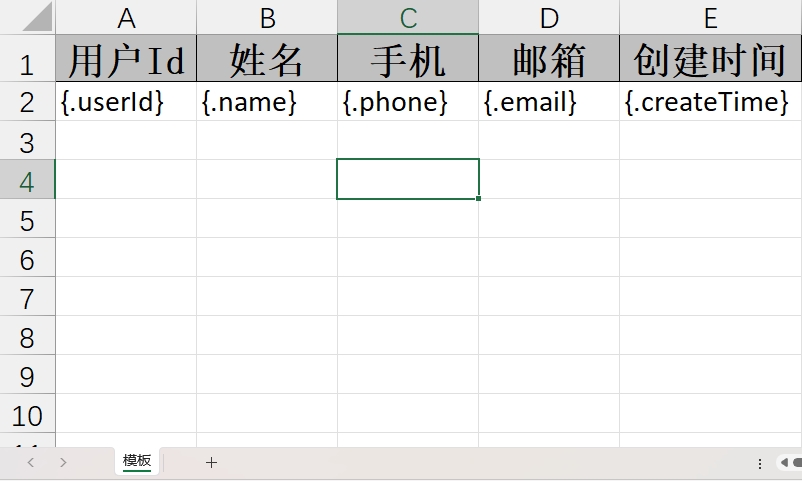
模板文件信息
@AllArgsConstructor
@NoArgsConstructor
@Data
public class User {

    @ExcelProperty(value = "用户Id")
    private Integer userId;

    @ExcelProperty(value = "姓名")
    private String name;

    @ExcelProperty(value = "手机")
    private String phone;

    @ExcelProperty(value = "邮箱")
    private String email;

    @ExcelProperty(value = "创建时间")
    private Date createTime;
}
@GetMapping("/download5")
public void download5(HttpServletResponse response) {
    try (InputStream in = new ClassPathResource("测试3.xls").getInputStream()) {
        response.setContentType("application/vnd.ms-excel");
        response.setCharacterEncoding("utf-8");
        // 这里URLEncoder.encode可以防止中文乱码 当然和easyexcel没有关系
        String fileName = URLEncoder.encode("测试3", "UTF-8").replaceAll("\\+", "%20");
        response.setHeader("Content-disposition", "attachment;filename=" + fileName + ".xls");

        User user = new User(1, "张三", "12345678901", "zhangsan@qq.com", new Date());
        EasyExcel.write(response.getOutputStream(), User.class)
                .withTemplate(in)
                .sheet("模板")
                .doFill(user);
    } catch (Exception e) {
        e.printStackTrace();
    }
}
**注意:**填充模板跟写文件使用的方法不一致,模板填充使用的方法是 doFill ,而不是 doWrite
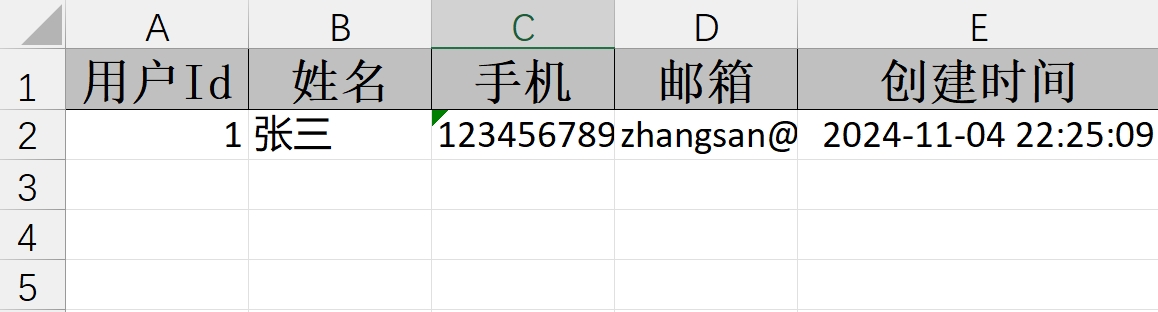
导出文件内容
List 填充导出
对象导出
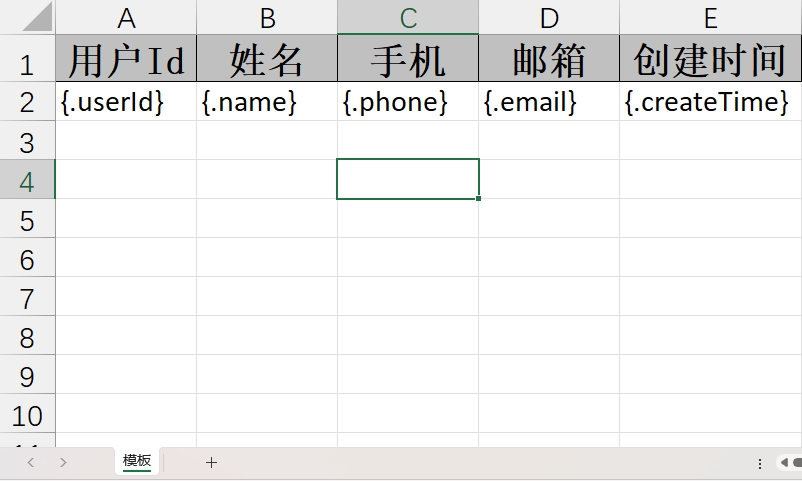
模板文件信息
@AllArgsConstructor
@NoArgsConstructor
@Data
public class User {

    @ExcelProperty(value = "用户Id")
    private Integer userId;

    @ExcelProperty(value = "姓名")
    private String name;

    @ExcelProperty(value = "手机")
    private String phone;

    @ExcelProperty(value = "邮箱")
    private String email;

    @ExcelProperty(value = "创建时间")
    private Date createTime;
}
@GetMapping("/download2")
public void download2(HttpServletResponse response) {
    try (InputStream in = new ClassPathResource("测试.xls").getInputStream()) {
        response.setContentType("application/vnd.ms-excel");
        response.setCharacterEncoding("utf-8");
        // 这里URLEncoder.encode可以防止中文乱码 当然和easyexcel没有关系
        String fileName = URLEncoder.encode("测试", "UTF-8").replaceAll("\\+", "%20");
        response.setHeader("Content-disposition", "attachment;filename=" + fileName + ".xls");

        List<User> userList = new ArrayList<>();
        userList.add(new User(1, "张三", "12345678901", "zhangsan@qq.com", new Date()));
        userList.add(new User(2, "李四", "12345678902", "lisi@qq.com", new Date()));
        EasyExcel.write(response.getOutputStream(), User.class)
                .withTemplate(in)
                .sheet("模板")
                .doFill(userList);
    } catch (Exception e) {
        e.printStackTrace();
    }
}
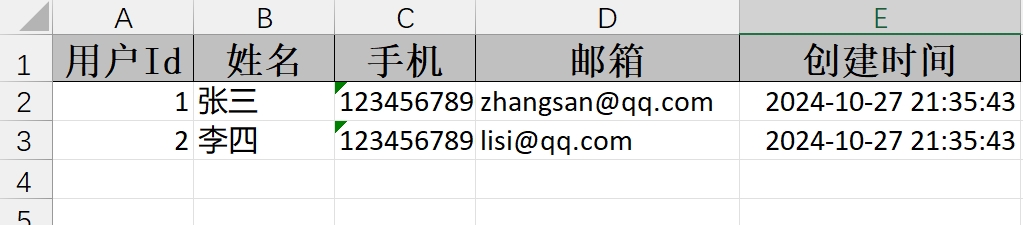
导出文件内容
对象嵌套对象(默认不支持)
原因排查
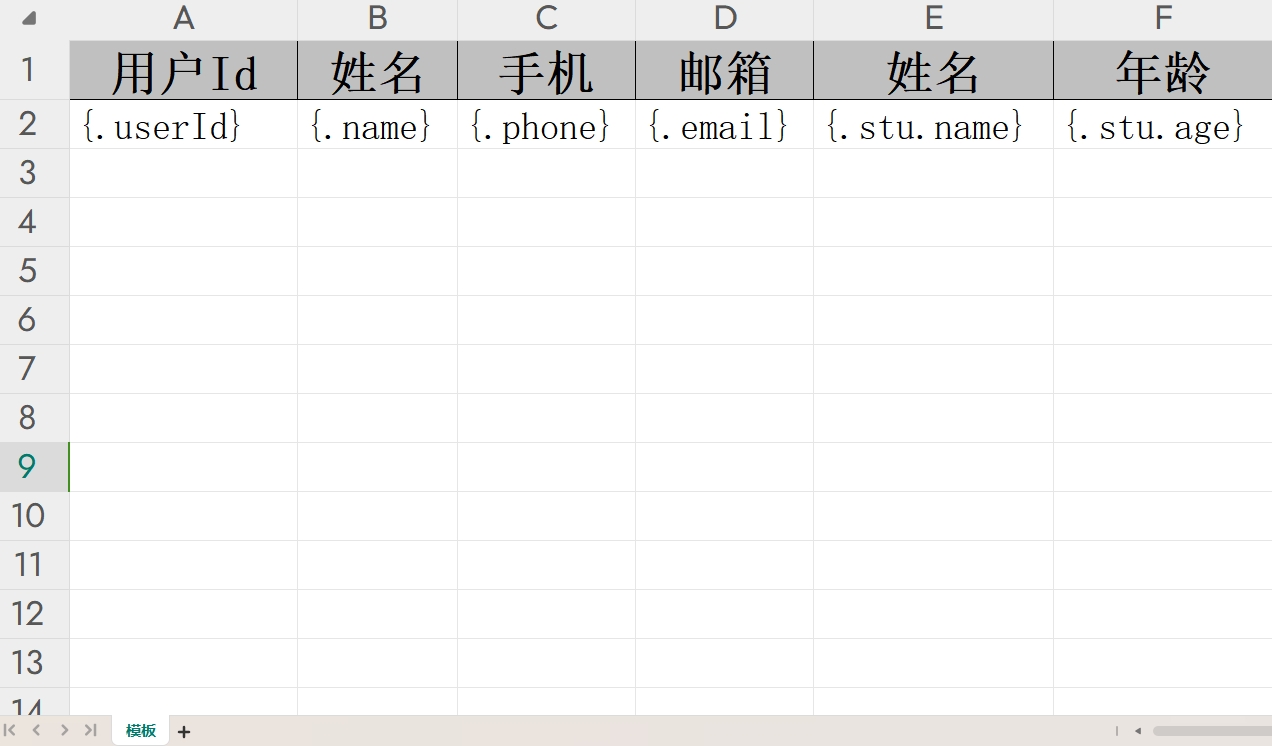
模板文件信息
@AllArgsConstructor
@NoArgsConstructor
@Data
public class User {

    @ExcelProperty(value = "用户Id")
    private Integer userId;

    @ExcelProperty(value = "姓名")
    private String name;

    @ExcelProperty(value = "手机")
    private String phone;

    @ExcelProperty(value = "邮箱")
    private String email;

    @ExcelProperty(value = "学生")
    private Student stu;

    @NoArgsConstructor
    @AllArgsConstructor
    @Data
    public static class Student {

        @ExcelProperty("姓名")
        private String name;

        @ExcelProperty("年龄")
        private Integer age;
    }
}
@GetMapping("/download3")
public void download3(HttpServletResponse response) {
    try (InputStream in = new ClassPathResource("测试2.xls").getInputStream()) {
        response.setContentType("application/vnd.ms-excel");
        response.setCharacterEncoding("utf-8");
        // 这里URLEncoder.encode可以防止中文乱码 当然和easyexcel没有关系
        String fileName = URLEncoder.encode("测试2", "UTF-8").replaceAll("\\+", "%20");
        response.setHeader("Content-disposition", "attachment;filename=" + fileName + ".xls");

        List<User> userList = new ArrayList<>();
        userList.add(new User(1, "张三", "12345678901", "zhangsan@qq.com", new User.Student("张三", 12)));
        userList.add(new User(2, "李四", "12345678902", "lisi@qq.com", new User.Student("李四", 13)));
        EasyExcel.write(response.getOutputStream(), User.class)
                .withTemplate(in)
                .sheet("模板")
                .doFill(userList);
    } catch (Exception e) {
        e.printStackTrace();
    }
}
导出文件内容

结果:Student 类的内容没有填充到模板文件中
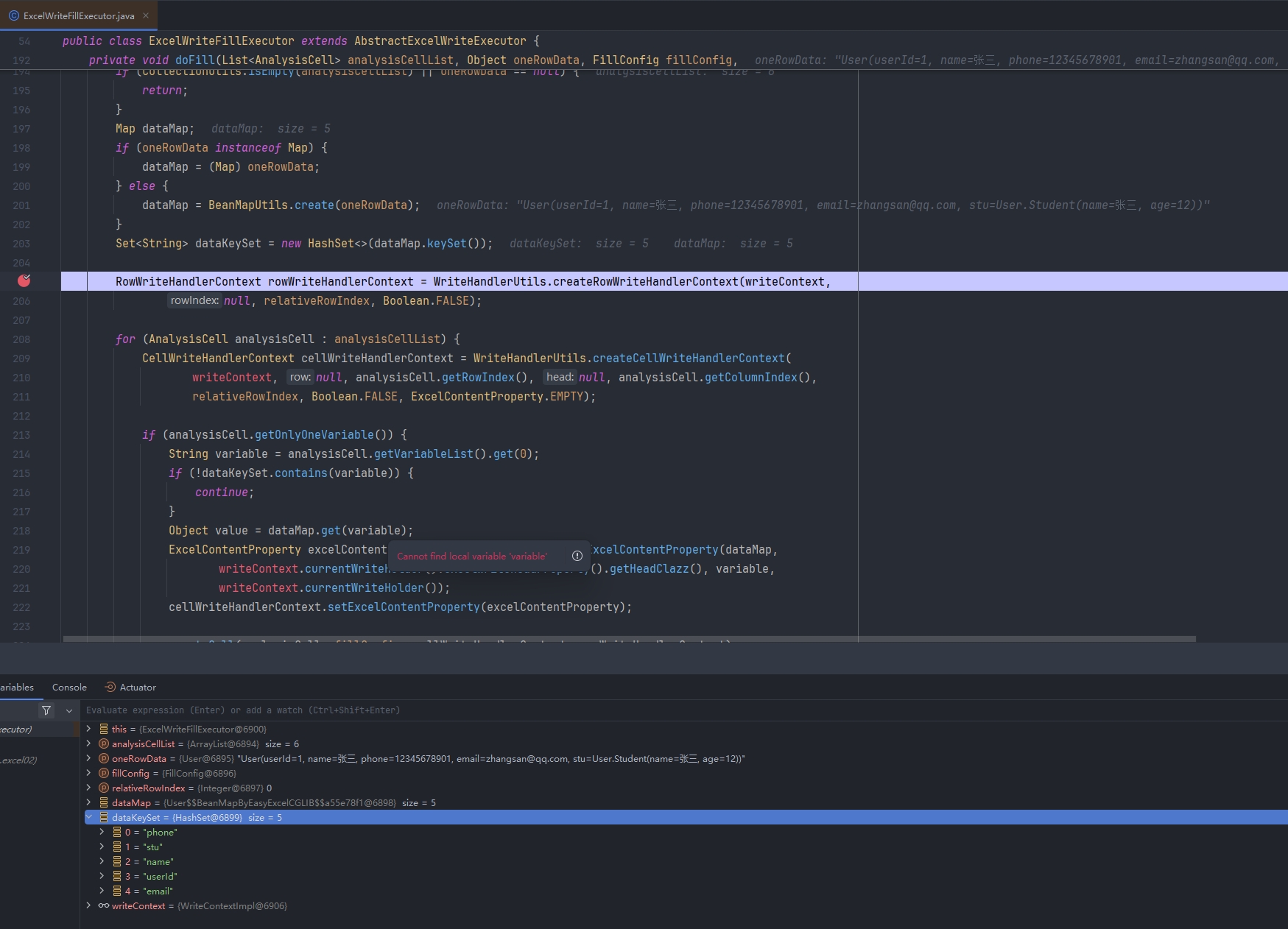
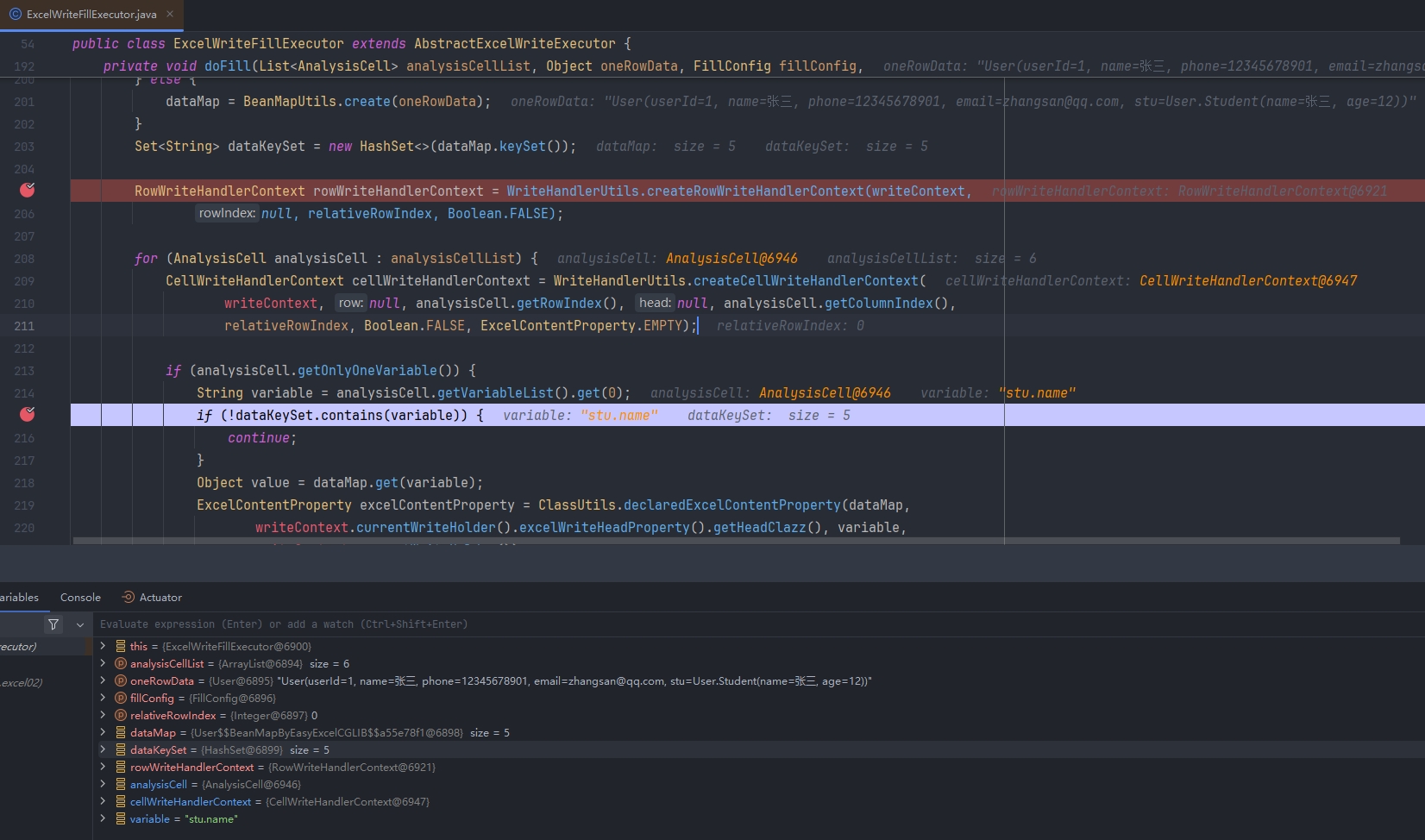
查看 ExcelWriteFillExecutor 源码
可以看到 dataKeySet 集合中的数据只有 stu(没有 stu.name 和 stu.age),在! dataKeySet.contains(variable)方法中判断没有包含该字段信息,所以被过滤掉
修改源码支持
在 com.alibaba.excel.write.executor 包下创建 ExcelWriteFillExecutor 类,跟源码中的类名称一致,尝试修改 analysisCell.getOnlyOneVariable()方法中的逻辑以便支持嵌套对象,修改如下:
根据分隔符.进行划分,循环获取对象中字段的数据,同时在 FieldUtils.getFieldClass 方法中重新设置 map 对象和字段
if (analysisCell.getOnlyOneVariable()) {
    String variable = analysisCell.getVariableList().get(0);
    String[] split = variable.split("\\.");

    Map map = BeanUtil.copyProperties(dataMap, Map.class);
    Object value = null;
    if (split.length == 1) {
        value = map.get(variable);
    } else {
        int len = split.length - 1;
        for (int i = 0; i < len; i++) {
            Object o = map.get(split[i]);
            map = BeanMapUtils.create(o);
        }
        value = map.get(split[split.length - 1]);
    }

    ExcelContentProperty excelContentProperty = ClassUtils.declaredExcelContentProperty(map,
            writeContext.currentWriteHolder().excelWriteHeadProperty().getHeadClazz(), split[split.length - 1],
            writeContext.currentWriteHolder());
    cellWriteHandlerContext.setExcelContentProperty(excelContentProperty);

    createCell(analysisCell, fillConfig, cellWriteHandlerContext, rowWriteHandlerContext);
    cellWriteHandlerContext.setOriginalValue(value);
    cellWriteHandlerContext.setOriginalFieldClass(FieldUtils.getFieldClass(map, split[split.length - 1], value));

    converterAndSet(cellWriteHandlerContext);
    WriteCellData<?> cellData = cellWriteHandlerContext.getFirstCellData();

    // Restyle
    if (fillConfig.getAutoStyle()) {
        Optional.ofNullable(collectionFieldStyleCache.get(currentUniqueDataFlag))
                .map(collectionFieldStyleMap -> collectionFieldStyleMap.get(analysisCell))
                .ifPresent(cellData::setOriginCellStyle);
    }
}
导出文件内容
查看导出的文件内容,此时发现嵌套对象的内容可以导出了

对象嵌套 List(默认不支持)
原因排查
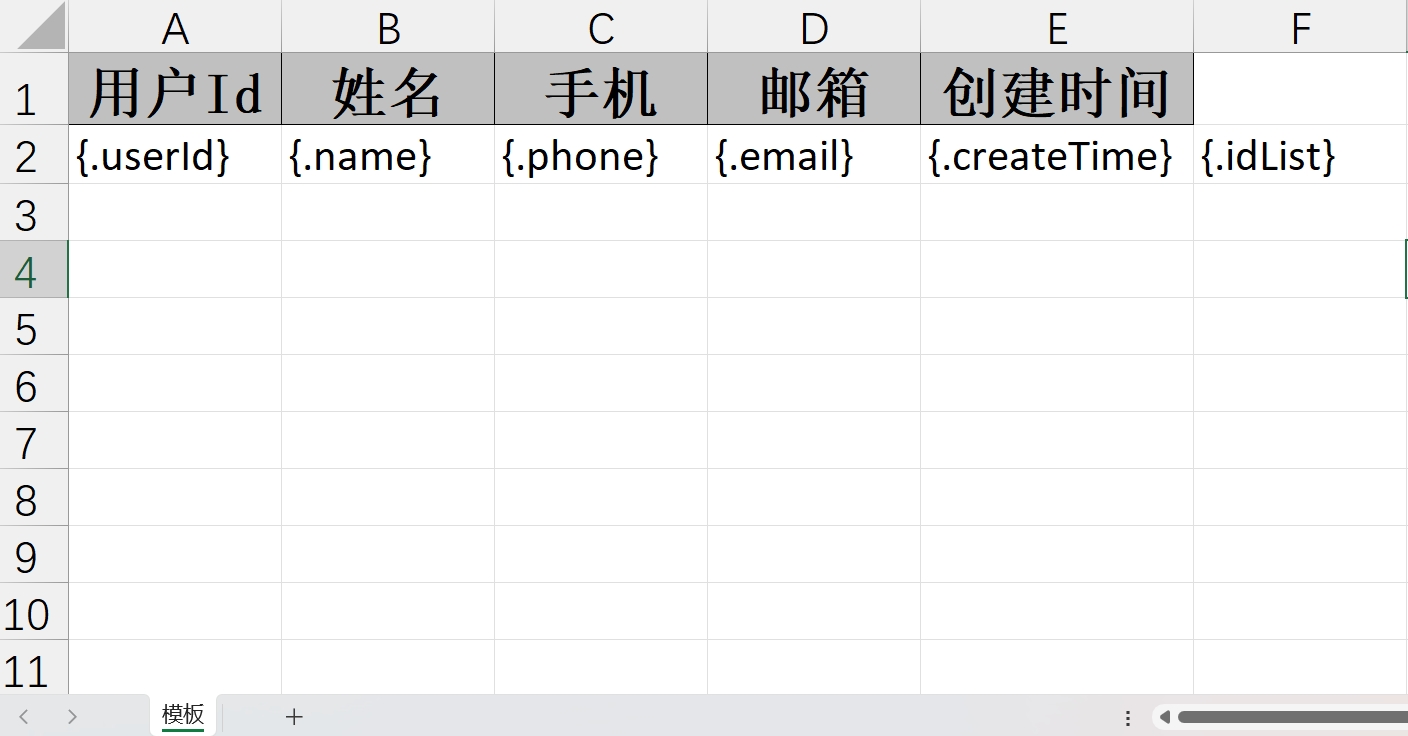
模板文件信息
@AllArgsConstructor
@NoArgsConstructor
@Data
public class User {

    @ExcelProperty(value = "用户Id")
    private Integer userId;

    @ExcelProperty(value = "姓名")
    private String name;

    @ExcelProperty(value = "手机")
    private String phone;

    @ExcelProperty(value = "邮箱")
    private String email;

    @ExcelProperty(value = "创建时间")
    private Date createTime;

    @ExcelProperty(value = "id列表")
    private List<String> idList;
}
@GetMapping("/download4")
public void download4(HttpServletResponse response) {
    try (InputStream in = new ClassPathResource("测试2.xls").getInputStream()) {
        response.setContentType("application/vnd.ms-excel");
        response.setCharacterEncoding("utf-8");
        // 这里URLEncoder.encode可以防止中文乱码 当然和easyexcel没有关系
        String fileName = URLEncoder.encode("测试", "UTF-8").replaceAll("\\+", "%20");
        response.setHeader("Content-disposition", "attachment;filename=" + fileName + ".xls");

        List<User> userList = new ArrayList<>();
        userList.add(new User(1, "张三", "12345678901", "zhangsan@qq.com", new Date(), Arrays.asList("234", "465")));
        userList.add(new User(2, "李四", "12345678902", "lisi@qq.com", new Date(), Arrays.asList("867", "465")));
        EasyExcel.write(response.getOutputStream(), User.class)
                .withTemplate(in)
                .sheet("模板")
                .doFill(userList);
    } catch (Exception e) {
        e.printStackTrace();
    }
}
执行后会发现报错 Can not find 'Converter' support class ArrayList.
EasyExcel 默认不支持对象嵌套 List 的,可以通过自定义转换器的方式修改导出的内容
自定义转换器
public class ListConvert implements Converter<List> {

    @Override
    public WriteCellData<?> convertToExcelData(List value, ExcelContentProperty contentProperty, GlobalConfiguration globalConfiguration) {
        if (value == null || value.isEmpty()) {
            return new WriteCellData<>("");
        }
        String val = (String) value.stream().collect(Collectors.joining(","));
        return new WriteCellData<>(val);
    }

    @Override
    public List convertToJavaData(ReadCellData<?> cellData, ExcelContentProperty contentProperty, GlobalConfiguration globalConfiguration) {
        if (cellData.getStringValue() == null || cellData.getStringValue().isEmpty()) {
            return new ArrayList<>();
        }
        List list = new ArrayList();
        String[] items = cellData.getStringValue().split(",");
        Collections.addAll(list, items);
        return list;
    }
}
@AllArgsConstructor
@NoArgsConstructor
@Data
public class User {

    @ExcelProperty(value = "用户Id")
    private Integer userId;

    @ExcelProperty(value = "姓名")
    private String name;

    @ExcelProperty(value = "手机")
    private String phone;

    @ExcelProperty(value = "邮箱")
    private String email;

    @ExcelProperty(value = "创建时间")
    private Date createTime;

    @ExcelProperty(value = "id列表", converter = ListConvert.class)
    private List<String> idList;
}
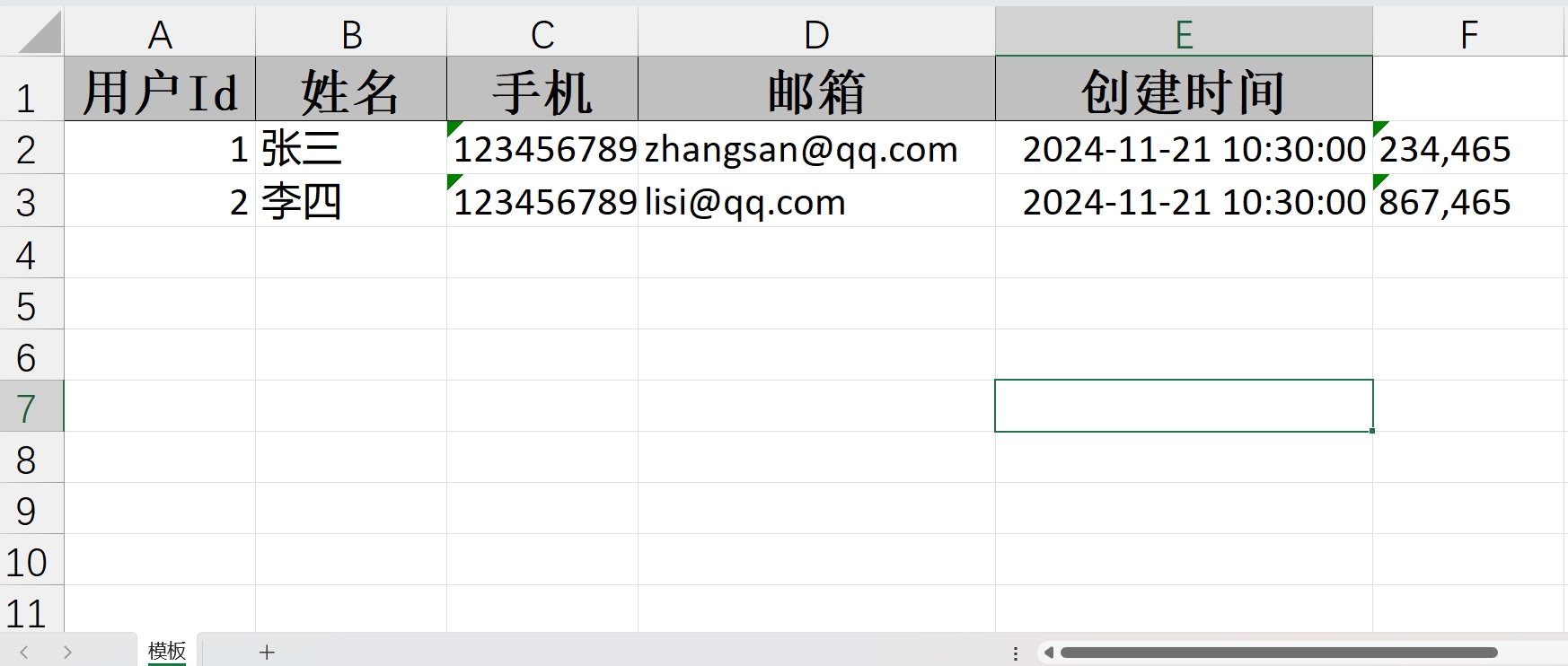
导出文件内容
可以看到 List 列表的数据导出内容为 String 字符串,显示在一个单元格内
Map 填充导出
简单导出
模板文件信息
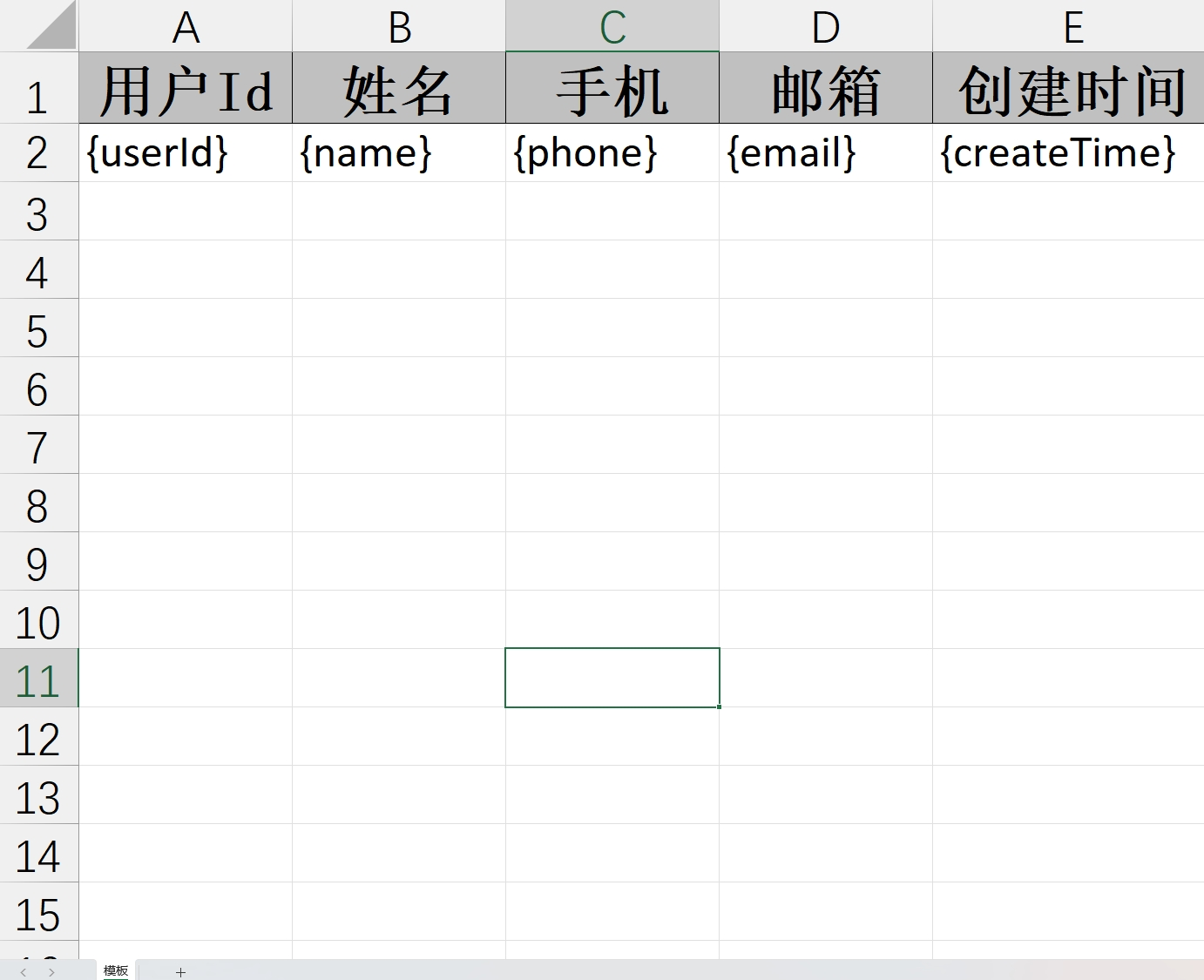
注意:map跟对象导出有所区别,最前面没有.
@GetMapping("/download4")
public void download4(HttpServletResponse response) {
    try (InputStream in = new ClassPathResource("测试3.xls").getInputStream()) {
        response.setContentType("application/vnd.ms-excel");
        response.setCharacterEncoding("utf-8");
        // 这里URLEncoder.encode可以防止中文乱码 当然和easyexcel没有关系
        String fileName = URLEncoder.encode("测试", "UTF-8").replaceAll("\\+", "%20");
        response.setHeader("Content-disposition", "attachment;filename=" + fileName + ".xls");

        Map<String, String> map = new HashMap<>();
        map.put("userId", "123");
        map.put("name", "张三");
        map.put("phone", "12345678901");
        map.put("email", "zhangsan@qq.com");
        map.put("createTime", "2021-01-01");
        EasyExcel.write(response.getOutputStream(), User.class)
                .withTemplate(in)
                .sheet("模板")
                .doFill(map);
    } catch (Exception e) {
        e.printStackTrace();
    }
}
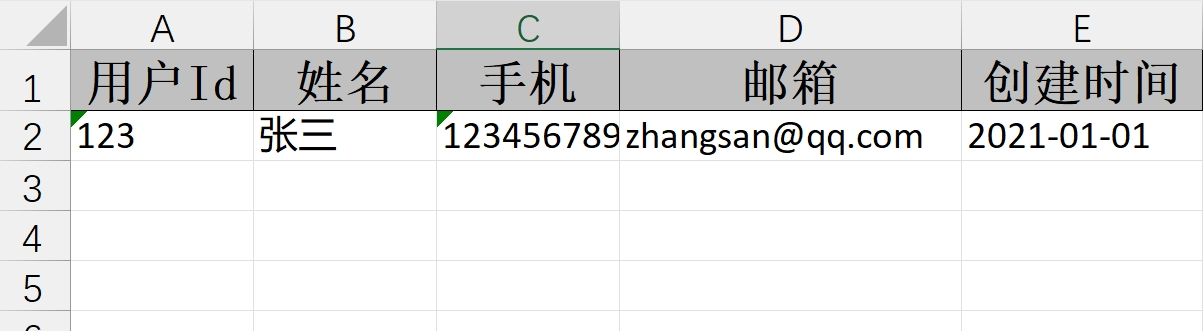
导出文件内容
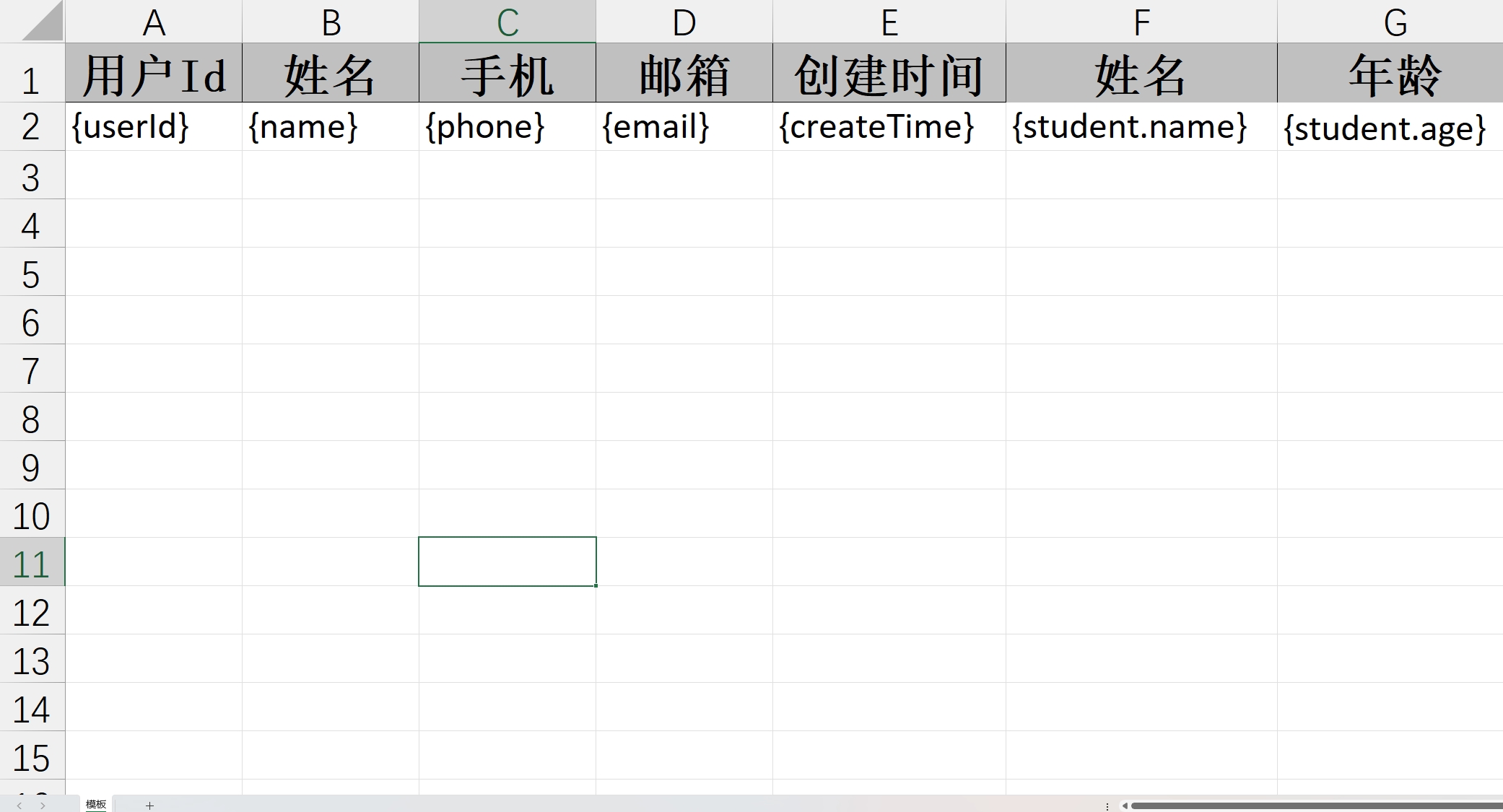
嵌套方式(不支持)
模板文件信息
@GetMapping("/download4")
public void download4(HttpServletResponse response) {
    try (InputStream in = new ClassPathResource("测试3.xls").getInputStream()) {
        response.setContentType("application/vnd.ms-excel");
        response.setCharacterEncoding("utf-8");
        // 这里URLEncoder.encode可以防止中文乱码 当然和easyexcel没有关系
        String fileName = URLEncoder.encode("测试", "UTF-8").replaceAll("\\+", "%20");
        response.setHeader("Content-disposition", "attachment;filename=" + fileName + ".xls");

        Map<String, String> map = new HashMap<>();
        map.put("userId", "123");
        map.put("name", "张三");
        map.put("phone", "12345678901");
        map.put("email", "zhangsan@qq.com");
        map.put("createTime", "2021-01-01");
        map.put("student.name", "小张");
        map.put("student.age", "23");
        EasyExcel.write(response.getOutputStream(), User.class)
                .withTemplate(in)
                .sheet("模板")
                .doFill(map);
    } catch (Exception e) {
        e.printStackTrace();
    }
}
导出文件内容
注意:Easyexcel 不支持嵌套的方式导出数据
